
The Internet is built upon numerous protocols that dictate how data moves across the network. Among them, two critical ones are PPPoE (Point-to-Point Protocol over Ethernet) and DHCP (Dynamic Host Configuration Protocol). They are fundamentally different but equally essential to understand for anyone seeking knowledge about networking.
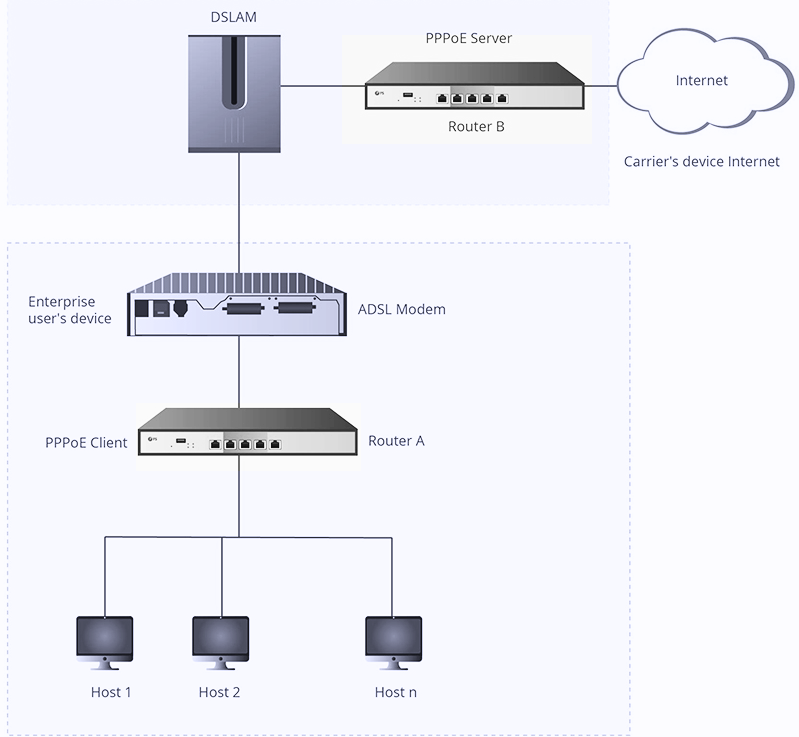
PPPoE stands for Point-to-Point Protocol over Ethernet, which encapsulates Point-to-Point Protocol (PPP) frames within Ethernet frames. Essentially, it blends the capabilities of two separate protocols—PPP and Ethernet. PPP is responsible for authentication and encryption, while Ethernet supports multiple users on a Local Area Network (LAN).PPPoE operates in two phases—Discovery and Session. The Discovery phase identifies the Ethernet MAC address and establishes a session ID. The Session phase sees data transferred over the PPP link within PPPoE headers, establishing a connection between the user and the remote site. For more details on PPPoE and how it functions, click here.

On the other hand, the Dynamic Host Configuration Protocol (DHCP) serves a different purpose. DHCP is a network management protocol used on networks that use IP (Internet Protocol). It allows computers to "request" and be assigned IP addresses automatically, as well as other network parameters, allowing them to connect and communicate with other network devices.
DHCP operates on a client-server model. When a computer or device is connected to a network, the DHCP client software sends a broadcast query requesting the necessary information. A DHCP server responds to the request with the information, allowing the device to communicate on the network. For an in-depth understanding of how DHCP works, click here.
While both PPPoE and DHCP are important for internet connectivity, they serve different functions and have different implications for your network.
| PPPoE | DHCP |
|---|---|
| Requires a username and password for connection, facilitating authentication and security. | No username or password is needed, as IP addresses are assigned automatically. |
| Generally requires manual configuration. | Offers "plug and play" convenience by automatically assigning IP addresses and other network parameters. |
| Commonly used for connections over large distances, such as connecting to an ISP. | Typically used within local networks (like office or home networks) to manage connected devices. |
For a detailed comparison between PPPoE and DHCP, click here.
Just like any other network protocol, both PPPoE and DHCP have their strengths and weaknesses. Let's dig deeper into these:
| Strengths | Weaknesses | |
|---|---|---|
| PPPoE |
|
|
| DHCP |
|
|
To explore more about the strengths and weaknesses of PPPoE and DHCP, click here.
The choice between PPPoE and DHCP largely depends on your specific network needs and the environment in which you'll use them.
If you're an Internet Service Provider (ISP) looking for a way to manage your customers and their access efficiently, PPPoE might be the better choice due to its support for authentication and session tracking.
On the other hand, if you're managing a local network where devices frequently join or leave, DHCP could be more suitable because of its automatic IP address assignment and configuration capabilities.
Remember, both protocols can coexist in the same network environment serving different purposes. They are not mutually exclusive and often, they complement each other.
For guidance on choosing between PPPoE and DHCP for your specific scenario, click here.
Address : 5F,Zhongshunyiquan Industry Park, Fuqian Road,Longhua District, Shenzhen, China
Address : 5F,Zhongshunyiquan Industry Park, Fuqian Road,Longhua District, Shenzhen, China
Tel : +86-755-23771707
Whatsapp : +86 13544277727
Email : sales@gezhi.net
Skype : 13544277727
Copyright Gezhi Photonics Co.,Ltd. All rights reserved.


