
The world of networking is filled with terms that can be confusing, especially when those terms seem to overlap. Layer 3 switches and routers are two such devices that have a broad deployment in network data transmission. At a high level, a Layer 3 switch is designed to connect hosts and form Local Area Networks (LANs), while routers are meant to connect multiple LANs into Wide Area Networks (WANs). Despite their similarities, Layer 3 switches and routers have different performance, flexibility, and cost characteristics that can impact your network design decisions.
A Layer 3 switch is a device that forwards traffic based on Layer 3 information (mainly IP addresses), while still retaining all the features of a Layer 2 switch. This device evolved to improve network routing performance on large Local Area Networks (LANs). Layer 3 switches perform packet forwarding using specialized Application-Specific Integrated Circuits (ASICs), making them faster than traditional routers. Yet, they usually lack some of the advanced functionalities found in routers. Layer 3 switches are also referred to as "multilayer switches" and are commonly found in Gezhi's 10GbE switches and Gigabit PoE switches.
A router is a crucial hardware component in both home and small business networks. It serves as the intermediary between devices in a network and the internet. Unlike Layer 3 switches, routers forward traffic based on Layer 3 information using IP addresses, allowing network communication across different protocols. Routers also serve as the first line of network security, protecting the network from potential attacks and intrusions.

The following table presents a comparison between Layer 3 switches and routers based on some fundamental features:
| Features | Layer 3 Switch | Router |
|---|---|---|
| Layer 3 Basic Routing | Yes | Yes |
| Traffic Management | Yes | Yes |
| WIC Card Support | No | Yes |
| Advanced Routing Features | No | Yes |
| Forwarding Architecture | Hardware-ASIC | Software-IOS |
| RMON Support | Yes | No |
| Policy Performance | High | Low |
| WAN Support | No | Yes |
| WAN Interfaces | No | Yes |
| QoS Features | No | Yes |
| NAT | No | Yes |
| LAN Capabilities | Yes | No |
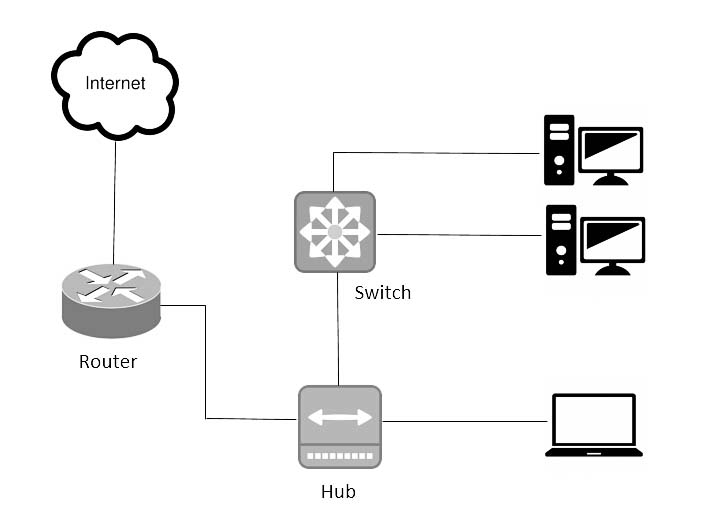
A Layer 3 switch is both a switch and a router since it can route packets by inspecting both their IP addresses and their MAC addresses. Layer 3 switches are capable of segregating ports into separate VLANs and can perform routing between them. Like traditional routers, a Layer 3 switch can also support routing protocols such as RIP, OSPF, and EIGRP.
Despite their similarities, Layer 3 switches and routers have several distinct differences, including their hardware makeup, interface support, and working principles:
Hardware: Layer 3 switches combine the hardware capabilities of traditional switches and routers to provide improved performance for LANs. Designed specifically for use on intranets, a Layer 3 switch usually lacks the WAN ports and features commonly found in routers. This specialization makes Layer 3 switches ideal for routing between VLANs.Interfaces: Layer 3 switches typically only support Ethernet interfaces for RJ45 and single-mode/multimode fiber, while routers offer more options such as SDH, SONET, E1/T1, etc. Originally, routers were
designed to connect different networks together, so they inherently support more varied interfaces to accommodate different network structures and transmission mediums.Working Principles: The most notable difference between Layer 3 switches and routers lies in their working principles. A Layer 3 switch uses ASIC hardware to route packets, making it faster and more efficient when routing within VLANs in a LAN setting. A router, on the other hand, uses its software control plane (Cisco IOS, for example) to perform routing, which makes it more flexible and better equipped to handle complex routing protocols and tasks such as WAN connectivity, Network Address Translation (NAT), Dynamic Host Configuration Protocol (DHCP), firewall functionality, and VPN support.
The decision between Layer 3 switches and routers depends on the particular network design and requirements. If high-speed routing in a LAN environment is the primary concern, then a Layer 3 switch would be a better choice. Its hardware-based packet forwarding provides greater efficiency and speed. However, if the network requires more advanced functionalities, such as WAN connectivity, NAT, firewall, VPN support, and interfacing with different network protocols and mediums, then a router would be more appropriate.
In practical networking, a mix of Layer 3 switches and routers is often used. Layer 3 switches are commonly deployed at the core and distribution layers to ensure fast internal data routing, while routers are placed at the edge to handle external data routing and provide advanced features such as NAT, firewall, and VPN support.
Whether to use a Layer 3 switch or a router ultimately depends on your specific needs and requirements. Careful planning and understanding of these two devices will help in creating an efficient and secure network. If you have any more questions or need further clarification on Layer 3 switches vs routers, feel free to ask. The team at Gezhi would be glad to assist you.

Note: Always ensure that you choose your network devices based on the needs and specifications of your network, including aspects such as speed, security, and functionality requirements.
While we have broadly covered the differences and applications of Layer 3 switches and routers, let's take a deeper look into some more advanced concepts.
Layer 3 switches are sometimes referred to as multilayer switches because they integrate both switching (Layer 2) and routing (Layer 3) functionality. This dual nature makes them excellent at handling inter-VLAN traffic in large LAN environments. However, the lines between switching and routing are not always clear. As technologies evolve, more advanced switches capable of Layer 4-7 operations have emerged, known as Layer 4-7 or multilayer switches. These switches can understand and act upon data from higher protocol layers, offering better control and optimization of network traffic.
The future of networking lies in Software-Defined Networking (SDN). SDN is a new approach to network design that separates the control plane (which makes decisions about how to handle network traffic) from the data plane (which actually carries the traffic). This separation allows network administrators to manage network services through abstraction of lower-level functionality. It means that regardless of the underlying hardware, network administrators can manage network services through a centralized software-based controller. As a result, the distinction between Layer 3 switches and routers may become less significant in SDN environments.
With the arrival of 5G and eventually 6G, networking devices such as Layer 3 switches and routers will need to handle more data at faster speeds than ever before. The evolution of these devices and the standards that govern them will continue to be a fascinating area of development in the coming years.
In conclusion, both Layer 3 switches and routers play a pivotal role in modern networking. Layer 3 switches are adept at efficiently managing internal LAN traffic and inter-VLAN routing, while routers offer more advanced features, better versatility, and support for varied interfaces, making them ideal for connecting different networks and handling external traffic. The choice between a Layer 3 switch and a router depends on the network's specific needs and design.
As the networking landscape continues to evolve, the lines between these devices may blur even further. Concepts such as SDN and the advent of 5G and 6G will shape the future of these networking devices. Always remember to stay informed about the latest networking trends and choose the right networking devices to ensure the best performance and efficiency for your network.
If you need any assistance or further information regarding Layer 3 switches or routers, don't hesitate to reach out to our team at Gezhi. We are more than happy to help!
Given the nuanced differences between Layer 3 switches and routers, the choice between the two comes down to the specific needs of your network. Here's a simplified guide to help you choose the right device for your network:
You need to manage a large local area network (LAN), especially when there are several subnets or VLANs involved. Layer 3 switches excel in efficiently routing traffic within VLANs while minimizing latency.
Your network has a high volume of traffic. Since Layer 3 switches use hardware-based switching, they can handle a larger traffic volume more efficiently compared to routers.
You're looking to improve security within your LAN. Layer 3 switches can restrict broadcast domains, limiting internal threats.
Your network needs to connect to the internet or other wide area networks (WANs). Routers are designed for external network connections and come equipped with WAN ports for this purpose.
Advanced routing features such as NAT, firewall services, or dynamic routing are required. Routers typically have a more extensive feature set compared to Layer 3 switches.
Robust security is a priority. With features like intrusion prevention and VPN support, routers can provide a comprehensive security solution for your network.
When integrating Layer 3 switches or routers into your network, remember to follow best practices to ensure optimal performance and security. Here are some recommendations:
Plan Your Network Design: Before choosing between a Layer 3 switch and a router, plan your network design carefully. Consider the size of your network, the number of subnets, the amount of traffic, and your security needs. A well-planned network can help you make the right choice.
Set Up VLANs: If you're using Layer 3 switches, set up VLANs to segment your network and enhance security. Each VLAN operates as a separate subnet, reducing the chances of a network-wide issue if a problem arises within a single VLAN.
Implement Security Measures: Regardless of whether you choose a Layer 3 switch or a router, implementing robust security measures is crucial. This could include setting up firewalls, intrusion detection systems, and VPNs, as well as regularly updating your device's firmware.
Monitor Your Network: Regularly monitor your network's performance to identify any potential issues early. You can use various network monitoring tools to track network traffic, detect unusual activity, and troubleshoot issues.
At Gezhi, we have a range of high-performance Layer 3 switches and routers to suit various networking needs. We also offer professional guidance to help you choose the most suitable devices for your network. Don't hesitate to reach out to us for further assistance.
Address : 5F,Zhongshunyiquan Industry Park, Fuqian Road,Longhua District, Shenzhen, China
Address : 5F,Zhongshunyiquan Industry Park, Fuqian Road,Longhua District, Shenzhen, China
Tel : +86-755-23771707
Whatsapp : +86 13544277727
Email : sales@gezhi.net
Skype : 13544277727
Copyright Gezhi Photonics Co.,Ltd. All rights reserved.


