
MAC (Media Access Control) addresses are integral for the functionality of networked devices. They serve as a unique identifier for these devices, including switches. But what is a switch MAC address? What purpose does it serve in a networked environment, and how is it different from an IP address? In this comprehensive guide, we'll delve into these questions and many more.
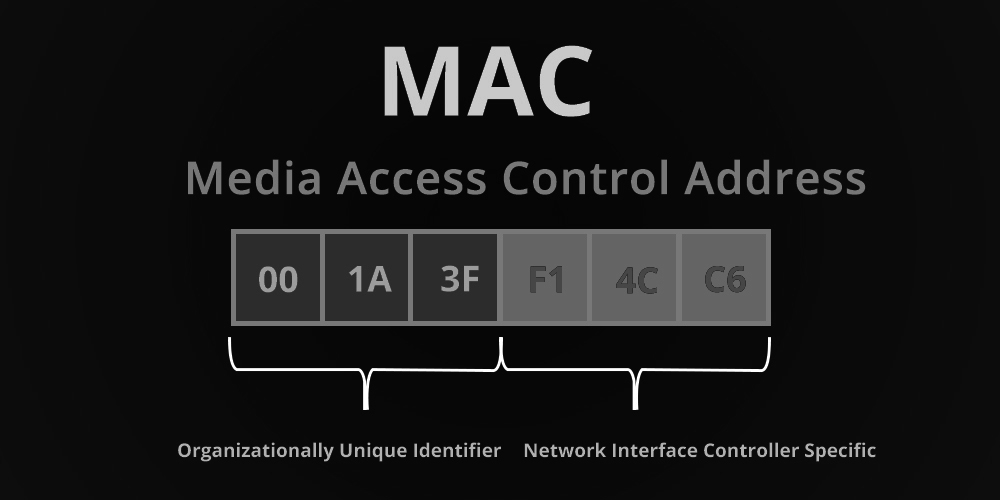
The MAC address, also known as a “hardware address” or “physical address,” is a unique binary number used to identify computer network adapters. Each data packet sent on an Ethernet always comes from a MAC address and is directed to a MAC address. Traditional MAC addresses consist of 12-digit hexadecimal numbers, with the leftmost six digits corresponding to a manufacturer's unique identifier and the rightmost six to the serial number of the network interface card (NIC).
While it might seem redundant to have MAC addresses and IP addresses, both serving as unique identifiers of networked devices, they function at different layers of the OSI model and serve different purposes. MAC addresses are used to direct packets from one device to the next on a network (Layer 2 of OSI), while IP addresses (Layer 3 of OSI) ensure the packets reach their ultimate destination. The MAC address gets the data packet to the next device, but the IP address is responsible for getting it to the ultimate destination. This makes both of them integral to network operation.
Unlike hubs or repeaters that simply rebroadcast every signal to every port, a network switch intelligently directs traffic between systems by routing packets only to their intended destination. This is achieved by tracking the MAC addresses of the NICs plugged into each port. A switch usually reserves a bunch of MAC addresses in its MAC address table to reduce broadcasts and ensure efficient data transfer.
Switches are intelligent devices that can build the MAC address table automatically. When a computer (let's call it Computer A) sends some data to another computer (Computer B), it creates an Ethernet frame with a source MAC address (AAA) and a destination MAC address (BBB).
The switch, upon receiving this Ethernet frame, learns the MAC address of Computer A and records this information in its MAC address table. The switch then broadcasts this frame to all interfaces, except the one it received the frame from. Once Computer B responds to Computer A by sending an Ethernet frame back to the switch, the switch learns the MAC address of Computer B and updates its MAC address table. This way, it can intelligently switch the frames instead of flooding Ethernet frames, enhancing network efficiency.

The MAC address table, which can be dynamically learned or manually configured, is crucial for frame forwarding. To enhance network security, you can manually add MAC address entries to the MAC address table, bind ports with MAC addresses, and fend off MAC address spoofing attacks.
| Step | Command | Remarks |
|---|---|---|
| 1. | Enter system view. | system-view |
| 2. | Add or modify a dynamic or static MAC address entry. | mac-address { dynamic | static } mac-address interface interface-type interface-number vlan vlan-id |
| 3. | Add or modify a blackhole MAC address entry. | mac-address blackhole mac-address vlan vlan-id |
Multi-port unicast MAC address table entries are helpful for associating a unicast MAC address with multiple ports. This enables packets that match the entry to be delivered to multiple destination ports.

| Step | Command | Remarks |
|---|---|---|
| 1. | Enter system view. | system-view |
| 2. | Configure a multi-port unicast MAC address table entry. | mac-address multiport mac-address interface interface-list vlan vlan-id |
The MAC address table on your switch uses an aging mechanism for dynamic entries. If dynamic MAC address entries are not updated within their aging time, they are deleted to make room for new entries.
| Step | Command | Remarks |
|---|---|---|
| 1. | Enter system view. | system-view |
| 2. | Configure the aging timer for dynamic MAC address entries. | mac-address timer { aging seconds | no-aging } |
To prevent the MAC address table from becoming excessively large and degrading switch performance, you can limit the number of MAC addresses that can be learned on a specific port.
| Step | Command | Remarks |
|---|---|---|
| 1. | Enter system view. | system-view |
| 2. | Enter Ethernet interface, port group, or Layer 2 aggregate interface view. | Use any of the following commands: - Enter Ethernet interface view: interface interface-type interface-number - Enter port group view: port-group manual port-group-name - Enter Layer 2 aggregate interface view: interface bridge-aggregation interface-number |
| 3. | Configure the MAC learning limit on the interface and specify whether frames with unknown source MAC addresses can be forwarded when the limit is reached. | mac-address max-mac-count { count | disable-forwarding } |
You can also limit the number of MAC addresses that can be learned on a per-VLAN basis.
| Step | Command | Remarks |
|---|---|---|
| 1. | Enter system view. | system-view |
| 2. | Enter VLAN view. | vlan vlan-id |
| 3. | Configure the MAC learning limit on the VLAN and specify whether frames with unknown source MAC addresses can be forwarded in the VLAN when the limit is reached. | mac-address max-mac-count { count | disable-forwarding } |
For effective network management, it's essential to be able to view and maintain the MAC address table on your switch.
| Task | Command | Remarks |
|---|---|---|
| 1. | Display MAC address table information. | display mac-address [mac-address [ vlan vlan-id ] | [ [ dynamic | static ] [ interface interface-type interface-number ] | blackhole ] [ vlan vlan-id ] [ count ] ] [ | { begin | exclude | include } regular-expression ] |
| 2. | Display multi-port unicast MAC address table entries. | display mac-address multiport [ vlan vlan-id ] [ count ] [ | { begin | exclude | include } regular-expression ] |
| 3. | Display the aging timer for dynamic MAC address entries. | display mac-address aging-time [ | { begin | exclude | include } regular-expression ] |
MAC addresses play a pivotal role in networked environments, ensuring seamless communication between devices on a local network. Switch MAC addresses, in particular, enable efficient data transfer by directing packets only to their intended destinations. Understanding the importance of MAC addresses and how switches use them can greatly enhance network performance and security.
Remember, MAC addresses and IP addresses are not redundant but complementary, serving different functions in the network infrastructure. By effectively configuring your switch MAC address table, you can optimize network traffic and improve overall performance.
Whether you're a seasoned network administrator or a curious enthusiast, comprehending the significance of MAC addresses will undoubtedly enhance your understanding of networking technologies and their applications.
For more insightful articles and information on cutting-edge networking solutions, visit Gezhi Photonics.
Address : 5F,Zhongshunyiquan Industry Park, Fuqian Road,Longhua District, Shenzhen, China
Address : 5F,Zhongshunyiquan Industry Park, Fuqian Road,Longhua District, Shenzhen, China
Tel : +86-755-23771707
Whatsapp : +86 13544277727
Email : sales@gezhi.net
Skype : 13544277727
Copyright Gezhi Photonics Co.,Ltd. All rights reserved.


